Ainvest provides a comprehensive suite of options tools designed to give retail traders an analytical edge. Whether you are just beginning to explore options data or you are an intermediate trader looking for deeper flow analysis and strategy-building capabilities, Ainvest's options product has something for you.
What Ainvest Options Offers
The platform brings together several core capabilities in one place:
- Flow Monitoring -- Track real-time call and put volume across major indices and individual tickers. Spot institutional activity as it happens.
- Option Chain Analysis -- Explore full option chains with bid/ask spreads, implied volatility, open interest, and volume data for any supported ticker.
- Strategy Builder -- Construct multi-leg options strategies visually and evaluate their payoff profiles before placing a trade.
- Rankings -- Browse options ranked by volume, open interest, and volume-to-open-interest ratio. Identify the most actively traded contracts at a glance.
- Volatility Analysis -- Study volatility smile and term structure charts to understand how implied volatility varies across strikes and expirations.
- Market Insights -- Read daily Option Flow Digest newsletters and option-related news articles curated by the Ainvest editorial team.
Who This Is For
Ainvest Options is built for retail traders who want access to institutional-grade options data and analytics without the complexity or cost of professional terminals. If you trade options -- or are considering it -- and want to understand what the market is doing beneath the surface, these tools are for you.
Where to Access
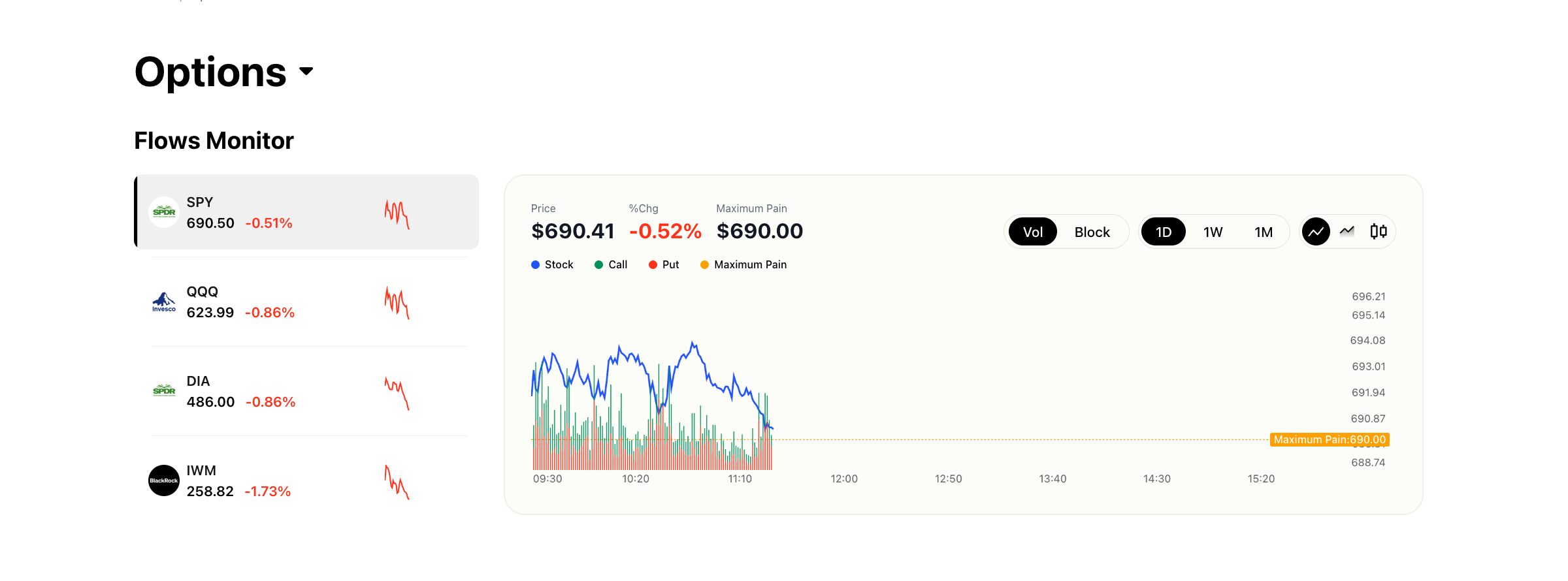
Ainvest offers options tools on both the web platform at ainvest.com and the Ainvest mobile app (iOS and Android). The two platforms share the same underlying data but present it in layouts optimized for their respective form factors. Some features are exclusive to one platform; the Feature Finder article below details every difference.
Recommended Reading Order
To get oriented quickly, we recommend reading the articles in this section in the following order:
- Navigating Options on Ainvest -- Learn where options tools live on web and mobile so you can find anything quickly.
- Feature Finder -- A quick-reference table mapping every feature to its exact location on each platform.
- Options Overview Page (Web) -- A detailed walkthrough of the main options dashboard on the web platform.
- Mobile Options Section -- A detailed walkthrough of the options experience in the Ainvest mobile app.
Once you have completed this Getting Started section, you will be ready to dive into the feature-specific documentation that covers each tool in depth.
Try it on Ainvest: Open the Options Dashboard — start exploring all options tools.